Monday, September 29, 2008

SDM - Switch Database Modifier

SDM is used for memory management on your switches. Anytime you hear the "Memory Management"  keyword  that means SDM in your switches.

Switches comes with a finite amount of memory, and, you may need to optimize your switch  to support all L2/L3 memory requirements for a specific type of traffic.

It brings us many possibilities of how we´re going to use the switch memory! But, the real question is... how to do it?!

We got default profiles, just keep in mind, no matter which profile you choose, it won´t break your lab, on the other hand, it can bring serious damages to a real network! So, always, plan before configuring anything!

The SDM Templates are used to optimize the switch for specific features, for IPv4 we have:

  • Access — The access template maximizes system resources for access control lists (ACLs) to accommodate a large number of ACLs.
  • Default — The default template gives balance to all functions.
  • Routing — The routing template maximizes system resources for unicast routing, typically required for a router or aggregator in the center of a network.
  • VLANs — The VLAN template disables routing and supports the maximum number of unicast MAC addresses. It would typically be selected for a Layer 2 switch.

So, anytime we change the SDM, which by the way, it´s the only command about Memory Management, we MUST reload the switch in order for to take effect! This is very important! If you do not reload the switch, and the proctor issue a show sdm and it shows it´ll be "routing"  on next reload, you lost your section points!

The configuration is pretty straight-forward, for example, to optimize routing, we use the global configuration command sdm prefer routing and that´s it, check this example:

Switch(config)# sdm prefer vlan
Switch(config)# end
Switch# reload
Proceed with reload? [confirm]

DO NOT forget to reload! Otherwise it won´t take effect! If you issue a show sdm before the reload, your output will look pretty much like this one:

Switch# show sdm prefer
 The current template is "desktop routing" template.
The selected template optimizes the resources in
the switch to support this level of features for
8 routed interfaces and 1024 VLANs.
  number of unicast mac addresses:            3K
  number of igmp groups + multicast routes:   1K
  number of unicast routes:                   11K
    number of directly connected hosts:       3K
    number of indirect routes:                8K
  number of qos aces:                         512
number of security aces:                    1K
 On next reload, template will be "desktop vlan" template.

Not difficult at all right?! More information can be found at:

http://cisco.com/en/US/docs/switches/lan/catalyst3560/software/release/12.2_46_se/configuration/guide/swsdm.html

Wednesday, September 24, 2008

He´s back ladies and gentleman!

Our friend, Mr. Mike Down, is back with his new blog I Don't Wanna Be a CCIE! Most of you had the chance to speak with him before, some of you don´t, but know that: HE´S THE MAN!

As usual he knows what he´s talking about, and how to do it!

I would follow his posts closely, as he knows everything inside out from the "backstages" of the CCIE and the CCIE Training World! And that´s cool!

Brother, welcome back, and count with me for anything you ever need! I´m here, no matter where you are, or to who you work, I´m your fan! ;)

Tuesday, September 23, 2008

Don´t believe "only" in the show run (in my case, in the show conf)

Hmm... buddy! Let me tell you something... don´t believe only in the show run, always check every parameter involved using other show commands...

Why do I say that?! Last weekend, during a new WS-3750 installation for user access, I faced a little problem... Two core´s, and my new access switch, with links to both Core Switches. Trunk was limitted only to the management vlan to avoid any problems during the intervation.

In order to avoid any other problems, I´ve increased to Spanning-Tree cost to 25 in both uplinks (1Gbps) from the access switch to the cores.

So far so good! Installation done with the first core, ok, let´s connect the second! Hmmm... lost access, let me try again, ok, accessing normal, so what happened?! Root Port from Core 1 changed to the Access Switch?! Why?!

That´s when I´ve found that one of the Core Switches had  spanning-tree costs of 3004, 3019... WTH! Quick show conf (yes, it is CatOS), the Core was configured with UpLinkFast...

No biggie, changed spanning-tree cost, path went back to normal, and everything else was good! Customer will check how and when to remove the UpLinkFast configuration.

If at any time, I´ve checked the spanning-tree with show commands (not the show conf), I would see that, but... living and learning, right?!

Now I do know why some guys don´t like to do a show run, they preffer to check with other commands, I think they´re right... ;)

Sunday, September 21, 2008

September edition of the CCIE Flyer just released!

The wonderful CCIE Flyer from Emmanuel Conde (CCIE Agent) was just released!

Man, I must say, they know what they´re talking about! I almost cried reading the article "Build a CCIE Workshop" from Emmanuel, I must agree with him that everything in there is TRUE!

Also, mr. Scott Morris wrote a fantastic article called "CCIE Training - First Day Preparations", a must read!

Plus many others! You must check it out! I just finished reading through everything, and I loved! Well... who will expect less than a AWESOME job from Emmanuel, right?! Emam, YOU´RE THE MAN!

-- Click here to be redirected to the  CCIE Flyer --

Friday, September 19, 2008

Storm-Control everything you need to know

Another part of the IPExpert Security Video-on-Demand, Storm-Control!

Storm-Control can be used to limit, or to set thresholds for different types of traffic (Broadcast, Multicast and Unicast) on a specific interface you choose (or that you´re asked for). ;)

You can set your threshold to whatever the top level that you want, and the traffic will be limit to that. Also, on 3560 Switches you can set falling thresholds too! Basically it is telling the switch how much traffic do I want (or don´t I want) through that interface.

Now... to the tricky part... just suppose you want to limit the broadcast/multicast traffic in a specific interface... how would you set?! Would you allow more Broadcast traffic than Multicast?!

Hmm... good question, let´s step back for a while... What´s a Layer 3 Broadcast?!

A Layer 3 Broadcast can be the "All Hosts" which is the 255.255.255.255, or it can be a "Subnet Brodcast", for example 172.168.10.255 is the broadcast IP of the /24 subnet;  just keep in mind that if the actual subnet mask change, the Broadcast IP will also change too!

Now... how about Layer 3 Multicasts?! What those guys are? 

Layer 3 Multicasts, known as Class D also, begin with the binary value of 1110 in the first octet. It goes from 224.x.x.x to 239.x.x.x. Also, at Class D we don´t have concept of subnetting of or broadcast reachability! So Broadcasts and Multicasts at "Layer 3" have nothing to do with each other.

Ok! With all that in mind, can you make a decision on how to configure the Storm-Control in one of your switch ports to limit the Broadcast / Multicast traffic?! Not that fast right?! There´s another wonderful world outside "Layer 3" it´s called "Layer 2" ! :)

At Layer 2, Broadcasts are know as "All F´s" FF-FF-FF-FF-FF-FF, this address represents all devices in a Layer 2 network, we all know that since the CCNA days, so, no big deal!

Now... The Layer 2 representation of IP Multicasts all begin with 01-00-5E. And there´s one specific bit in the MAC Address that defines whether or not it´s a Multicast, the I/G bit!

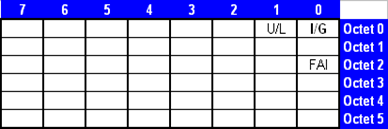
Take a look at the MAC Address format:
image

So, like our friend Scott Morris likes to say, the least significant bit of the most significant byte is the I/G bit! And looking at our Multicast Address 01-00-5E (in binary 0000 0001-0000 0000-0101 1110)  we can see that this I/G bit is set to 1 in EVERY Multicast!

In that case, the I/G bit defines a Multicast when it´s set to 1, but, how about the Broadcasts?! All bits in a Layer 2 Broadcast are set to 1 (including the I/G bit), so, Layer 2 Broadcasts, in fact, ARE a subset of Layer 2 Multicasts.

All Layer 2 Broadcasts are Multicasts.

All Layer 2 Multicasts are not Broadcasts.

With that in mind, when configuring Storm-Control in a switch port, and, if you´re setting limits to both Multicast and Broadcast, you should set Multicast limit HIGHER than the Broadcast limit (at least set they equal, but never set the Multicast level to be less than the Broadcast level, otherwise, either Broadcasts and Multicasts will be limited by the Multicast level, making pointless the Storm-Control configuration for the Broadcast!).

It´s configured on a per-interface basis, here´s the command list:

(config-if)#storm-control broadcast level (#)[.(#)]
(config-if)#storm-control multicast  level (#)[.(#)]
(config-if)#storm-control unicast level (#)[.(#)]


Level is % of line as maximum threshold
Level 100 would permit everything
Level 0.0 would disable the frame type

The following example will enable Unicast Storm-Control on a switch port with an 89% rising suppression level and a 67% falling suppression (remember, falling suppression can only be configured in 3560). It´ll also enable Broadcast Storm-Control on a port to a level of 20%. When the Broadcast exceeds the configured level of 20% of the total available bandwidth of the port within the traffic-storm-control interval, the switch drops all broadcast traffic until the end of the traffic-storm-control interval:

interface gigabitethernet0/1
storm-control unicast level 89 67
storm-control broadcast level 20

Just remember, Multicast levels (which includes more things) must be higher, or at least equal, to the Broadcast levels when configuring Storm-Control!

You can use the show storm-control command to verify the operation!

Nice! :)

More information available in do following Websites:

http://tcpmag.com/qanda/article.asp?EditorialsID=317

http://www.synapse.de/ban/HTML/P_LAYER2/Eng/P_lay207.html

http://www.faqs.org/rfcs/rfc1469.html

http://www.cisco.com/en/US/docs/switches/lan/catalyst3560/software/release/12.2_46_se/configuration/guide/swtrafc.html

Wednesday, September 17, 2008

Virtual Tour - CCIE Lab: A "must" see video!

I was checking one of my favorite CCIE resource on the Web, Sadikhov Forums -> CCIE Other, a very nice section to be checked once and a while! In there I´ve found a post from our friend Stacky about a very nice video in Cisco Website: Virtual Tour - CCIE Lab!

The video is 3 min long, but it´s AWESOME! At least you´ll get to know what you´ll face in the lab day, and how it looks like!

I do recomend to everybody, if you have a chance, check it out!

Here´s the link, it´s the third video in this page:

Certifications Connect - Becoming a CCIE

Thursday, September 11, 2008

IPExpert Blended Learning Solutions - Promotional Price ending soon!

For those who wants to get the awesome IPExpert CCIE R&S Blended Learning Solutions, I advise to act now! The price will increase soon, it´ll still the lowest price on the market, but why pay more, if you can have it now for USD 999.99 ?!

Talk to sales guys, they will clear any doubt you have, and there are many reviews about it over the internet! Just check it out!

I must say, the product is fantastic! Nothing like that! They use a different approach, not slide after slide, but a full motion movie, you, and the instructor! Very informative!

----

LAST MONTH for Blended Learning Solution Giveaway Pricing -- BUY NOW

The past two months has been an exciting time. Since we began our promotion offering our newly-created, ground-breaking Blended Learning Solution™ products for only $999, we have shipped nearly 1,000 of them to CCIE candidates around the world!

However, there are less than 2 WEEKS LEFT of this rock-bottom pricing for this unmatched level of training materials! On Monday, September 22, the prices for the Blended Learning Solution products will double, rising back to the level representative of the massive amount of quality materials delivered in this offering.

The message is, if you were planning to buy CCIE training materials, DO IT NOW and take advantage of a value unseen before anywhere.

http://www.imakenews.com/ipexpert/e_article001198618.cfm?x=bdlpKmg,bb3NCpTF

----

Wednesday, September 10, 2008

802.1x, Guest VLAN and Auth-Fail VLAN

Another security topic from IPExpert videos: 802.1x, nice, not too long, and easy to understand.

Dot1x is a specification for port based authentication, most of the time we hear about 802.1x is when somebody is talking about Wireless (hi Shiraishi). Basically it uses the same concept there, but it was originally created to be a switch based authentication mechanism.

By default, 802.1x uses RADIUS. This is where RADIUS, TACACS and AAA comes on the LAB, and that´s why they´re on the blueprint.

Also, keep in mind that there´s no RADIUS server on the CCIE R&S Lab Exam. So take a look at your diagram, check where the RADIUS server is "pretended" to be connected, and at the details they´re giving to us before stressing too much over it!

So, until the device is authenticated, 802.1x access control allows only Extensible Authentication Protocol (EAP) over LAN (EAPOL) traffic through the port to which the device is connected. After authentication is successful, normal traffic can pass through the port.

If the switch receives EAPOL packets in a port that is not configured for 802.1x authentication or if the switch does not support 802.1x authentication, then the EAPOL packets are dropped and are not forwarded to any upstream devices.

802.1x needs to be turned on globally and configured at each interface you actually want it:

To turn dot1x on:

(config)#dot1x system-auth-control

And at the interface:

(config-if)#dot1x port-control <type>

The type can be:

  • Auto - If this particular interface doesn´t receive a response from the host, the port will be disabled. It´ll send out the EAPOL packets  (Extensible Authentication Protocol), those EAPOL packets are basically saying: "Hey! Who are you?!" And hopefuly the switch gets a response! If it doesn´t get a response, by default, the port is not enabled. The users will not be able to access the network without authentication;
  • Force-authorized - No authentication is performed, it just pretend that the authentication just happened.  It´s normally used for routers;
  • Force-unauthorized - Similar to shutdown. It pretends that this port wasn´t authorized.

802.1x, Radius and AAA works really close to each other! 802.1x will send EAPOL packets and control the access, AAA will tell the Router/Switch "HOW" to authenticate, and Radius will authenticate the requesting host if configured to do so.

Be careful when doing AAA, otherwise you may get locked out of your switch, and that will force you take your lab again, with better lucky (or better prepared) next time!

Fortunately there are some technics to avoid locking yourself out of the switch! I´ve talked about that before (click here if you want to check that post), but, I consider it so important, that I´ll copy the contents here:

-> Turning 802.1x on in your system (also enabling RADIUS):

dot1x system-auth-control
aaa new-model
aaa authentication dot1x default group radius
radius-server host 150.100.220.100 key ipexpert

-> To avoid further complications with any port using "login" you´ll want to create a workaround. The Proctor will NOT do password recovery for grading you! So, we need to create a workaround for this:

aaa authentication login MyVTY line
aaa authentication login MyCon none
!
line con 0
login authentication MyCon
!
line vty 0 4
login authentication MyVTY

-> That way, Console will have no password, and the VTY will use the configured line password.

-> The bottom line is that while it is very irritating to lock yourself out of a switch it is MUCH better than locking the Proctor out!

-> Another thing you may do is "reload in 10" on the switch. If you haven´t validated your config and cancelled the reload, then at least you will fix things yourself!

-> (Do NOT save unvalidated configurations!!!)

As we go through we´re only going to do AAA authentication login, that´s the type of authentication we´re going to do.

But now, if someone responds to the EAPOL packets with incorrect credentials, or even worse, if someone doesn´t have a computer that supports 802.1x and don´t know how to respond to it?! What happen to those guys?! By default, the switch will keep sending EAPOL packets until it receives the correct credentials.

And that´s it?! Those guys will not be able to access the network?! Well, if we want yes, they´ll be out, but, we´re not that mean, right?! We can configure a "guest" VLAN, with limited access to the network, so those guys will be placed there!

With guest-vlan information (or with auth-fail vlan information) we have ways to setting up some options. The port needs to be at  mode access (can´t be dynamic in dot1x):

int fa0/10
switchport mode access
dot1x port-control auto
dot1x guest-vlan 100
dot1x auth-fail vlan 100
dot1x host-mode multi-host

That way, if the guy doesn´t support 802.1x authentication (or, if it´s not configured to do so), it´ll be allowed to use the configured guest-vlan (in our case VLAN100).

Also, if the guy use incorrect credentials (like wrong username/password), it´ll be allowed to use the auth-fail vlan (in this particular case, VLAN100 also).

But, how about that dot1x host-mode multi-host command, what´s that?! That will do 802.1x authentication for EVERY MAC Address using this link.

On the other hand, if we use the command dot1x host-mode single-host  as long as one MAC Address is validate, every MAC Address in this single link is allowed to go through!

Cool!

You can find more information at this link if you want:

http://www.cisco.com/en/US/products/hw/switches/ps708/products_configuration_example09186a00801d11a4.shtml